Function Parameters
These are the kind of function parameters we have looked at, where the arguments are matched one to one to parameters
def myfunc(first, second):
	print(first)
	print(second)

myfunc(30, 40)
Output:
30
40
You must pass exact number of arguments to such functions
you can assign default parameters to the function parameters
def myfunc(first, second=80):
	print(first)
	print(second)

myfunc(30)
Output:
30
80
all parameters with default values must be at the end of the parameter list
Keyword Passing (Passing arguments by Parameter Name)
These arguments can be passed in any order
def myfunc(first, second=80):
	print(first)
	print(second)

myfunc(second=10, first=60)
Output:
60
10
Indefinite Number of Arguments
Putting a * before parameter name, allows passing indefinite number of arguments, the arguments then combined into a tuple
def myfunc(*params):
	print(params)

myfunc("one", 2, 3, 4)
Output:
('one', 2, 3, 4)
def myfunc(*params):
	for x in params:
		print(x)

myfunc("one", 2, 3, 4)
output:
one
2
3
4
putting a ** before the parameter name allows indefinite number of keyword arguments, these arguments are combined into a dictionary
def myfunc(**params):
	print(params)

myfunc(one="one", two=2, three=3, four=4)
Mixing positional and named arguments:
def myfunc(one, two, *positional_args, **named_args):
	print(one)
	print(two)
	print(positional_args)
	print(named_args)

myfunc(1, 2, 3, 4, 5, 6)
output:
1
2
(3, 4, 5, 6)
{}
def myfunc(one, two, *positional_args, **named_args):
	print(one)
	print(two)
	print(positional_args)
	print(named_args)

myfunc(1, 2, 3, 4, five=5, six=6)
1
2
(3, 4)
{'five': 5, 'six': 6}
A case from top 10 mistakes python programmers make
https://www.toptal.com/python/top-10-mistakes-that-python-programmers-make
def foo(bar=[]):
	bar.append("baz")
	return bar

print(foo())
print(foo())
print(foo())
output:
['baz']
['baz', 'baz']
['baz', 'baz', 'baz']
the default value for a function argument is only evaluated once, at the time that the function is defined. Thus, the bar argument is initialized to its default (i.e., an empty list) only when foo() is first defined, but then calls to foo() (i.e., without a bar argument specified) will continue to use the same list to which bar was originally initialized.
In Class Exercise
We have a number of bunnies and each bunny has two big floppy ears. We want to compute the total number of ears across all the bunnies recursively. Do not use loops or multiplication
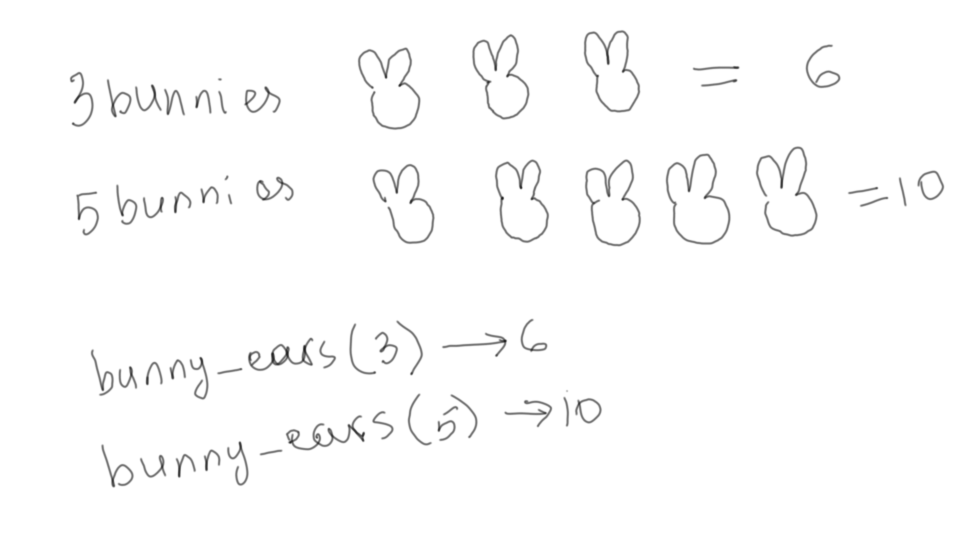
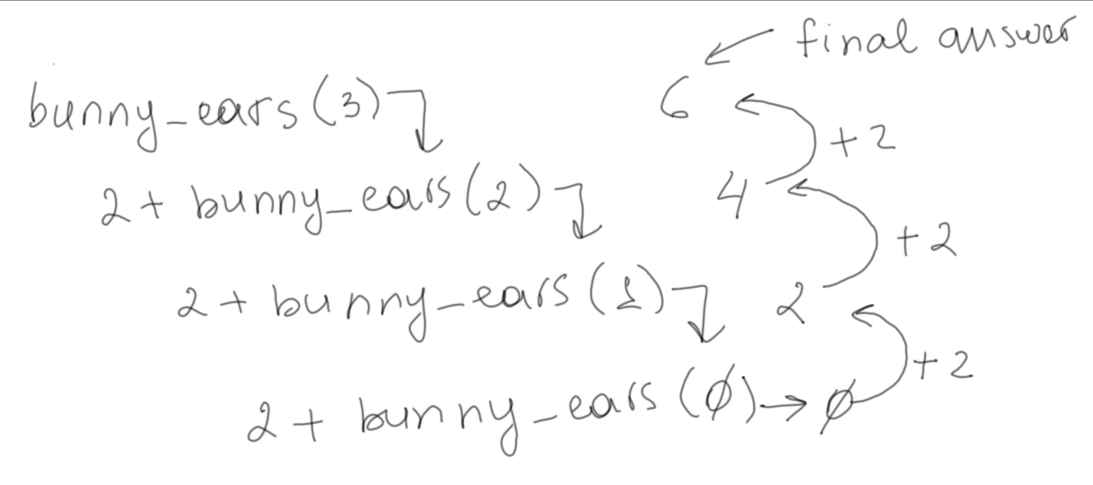
As you go through the bunnies, for every next bunny, add 2 years until there are no more bunnies left
Every recursion needs to have an exit case, when the recursion stops, also known as base condition.
In our case we stop when we ran out of bunnies, that will be our base condition, otherwise, keep doing what you did, but with 1 less bunny
Every recursion needs to have an exit case, when the recursion stops, also known as base condition.
In our case we stop when we ran out of bunnies, that will be our base condition, otherwise, keep doing what you did, but with 1 less bunny
def bunny_ears(num_bunnies):
	if(num_bunnies)==0:
		return 0
	return bunny_ears(num_bunnies-1)+2

result = bunny_ears(3)
print(result)
In Class Exercise
what happens if you have 2 functions with the same signature?
def bunny_ears(num_bunnies):
	pass

def bunny_ears(num_bunnies):
	if(num_bunnies)==0:
		return 0
	return bunny_ears(num_bunnies-1)+2

result = bunny_ears(3)
print(result)
output:
6
def bunny_ears(num_bunnies):
	if(num_bunnies)==0:
		return 0
	return bunny_ears(num_bunnies-1)+2

def bunny_ears(num_bunnies):
	pass

result = bunny_ears(3)
print(result)
output:
None
LOCAL AND GLOBAL VARIABLES
The variables declared inside the function are accessible only inside that function
def myfunc():
	a=5
	print("Inside Function")

myfunc()
print(a)
$ python example.py
Inside Function
Traceback (most recent call last):
  File "example.py", line 8, in <module>
    print(a)
NameError: name 'a' is not defined
Likewise, the parameter variables are accessible only inside the function
def myfunc(b=10):
	print("Inside Function")

myfunc()
print(b)
$ python example.py
Inside Function
Traceback (most recent call last):
  File "example.py", line 7, in <module>
    print(b)
NameError: name 'b' is not defined
Variables declared in the outer scope of a function can be read inside the function
g=10
def myfunc():
	print("Inside Function g is {}".format(g))

myfunc()
print("After the Function call g is {}".format(g))
$ python example.py
Inside Function g is 10
After the Function call g is 10
However, the moment you try to assign a value to g, Python assumes g to be local to the function
g = 5
def myfunc():
    print(g)
    g=8

myfunc()
print(g)
$ python example.py
Traceback (most recent call last):
  File "example.py", line 6, in <module>
    myfunc()
  File "example.py", line 3, in myfunc
    print(g)
UnboundLocalError: local variable 'g' referenced before assignment
adding global declaration inside the function will tell Python to consider g to be the global scope g from now on
g = 5
def myfunc():
    global g
    print(g)
    g=8

myfunc()
print(g)
$ python example.py
5
8
g = 5
def outer():
    g=3
    def myfunc():
        nonlocal g
        g=8
    myfunc()

outer()
print(g)
$ python example.py
5
LEGB Rule
The LEGB rule is a kind of name lookup procedure, which determines the order in which Python looks up names. For example, if you reference a given name, then Python will look that name up sequentially in the local, enclosing, global, and built-in scope. If the name exists, then you’ll get the first occurrence of it. Otherwise, you’ll get an error.
- Local (function)— Names assigned in any way within a function (def or lambda), and not declared global in that function
- Enclosing-function (nonlocal) — Names assigned in the local scope of any and all statically enclosing functions (def or lambda), from inner to outer
- Global (module) — Names assigned at the top-level of a module file, or by executing a global statement in a def within the file
- Built-in (Python) — Names preassigned in the built-in names module: open, range, SyntaxError, etc
Assigning Functions to Variables
you can assign functions to variables
def draw_clock():
	print("⏰")

def draw_hourglass():
	print("⏳")

def draw_hourglass():
	print("⛄")


p=draw_clock
p()
$ python example.py
⏰
or hold them in data structures
def draw_clock():
	print("⏰")

def draw_hourglass():
	print("⏳")

def draw_snowman():
	print("⛄")

pics = {"c":draw_clock, "h":draw_hourglass, "s":draw_snowman}

print("Menu:")

for x in pics.keys():
	print(x)

user_choice = input("Your choice:")

pics[user_choice]()
$ python example.py
Menu:
c
h
s
Your choice:c
⏰

$ python example.py
Menu:
c
h
s
Your choice:h
⏳

$ python example.py
Menu:
c
h
s
Your choice:s
⛄
A function can return another function
def outer():
    def inner():
        print("Hello from inner")
    return inner

new = outer()

new()
$ python example.py
Hello from inner
Lambda Functions
Small one-line functions can be declared as lambda functions and can reside as values of a dictionary
>>> f = lambda a,b: a+b
>>> f(3,4)
7


>>> s = lambda host, port, initial_url:"http://"+host+":"+port+"/"+initial_url
>>> s("localhost","8080", "home.html")
'http://localhost:8080/home.html'


g = lambda x: x**2
print(g(4))
d={
	"+":lambda p1, p2: p1+p2,
	"-":lambda p1, p2: p1-p2
}

print(d["+"](5,6))
print(d["-"](9,6))
$ python example.py
11
3
Generator Functions
Generator functions allow you to declare a function that behaves like an iterator, i.e. it can be used in a for loop.
def count_by_two(start, end):
	x = start
	while x < end:
		yield x
		x=x + 2

for i in count_by_two(0,10):
	print(i)
$ python example.py
0
2
4
6
8
Decorator Functions
Decorator takes in a function, adds some functionality and returns it.
Let's imagine we are building a data warehouse / data lake and we want to attach an internal id to every data record we receive. We could use a decorator for that
Let's imagine we are building a data warehouse / data lake and we want to attach an internal id to every data record we receive. We could use a decorator for that
import uuid #unique id provider

def return_user():
	return {"userId": "8d978b94-f64b-5131-9e22-f02b4394558b","emailAddr": "[email protected]"}

def return_employee():
	return {"firstName": "Zackery","lastName": "Crist","age": 42}

def return_colors():
	return ["green","yellow","red","yellow"]

def identifier(r):
	def inner():
		#takes the output of the passed function,
		#wraps in in data node and attaches uuid
		s = r()
		return {"_id":uuid.uuid1(), "data":s} #wrapped object
	return inner #return the decorator function


dec = identifier(return_employee)
res = dec()
print(res)

dec = identifier(return_colors)
res = dec()
print(res)
$ python example.py
{'_id': UUID('05665cec-ff6e-11ea-bffe-820f03b23a80'), 'data': {'firstName': 'Zackery', 'lastName': 'Crist', 'age': 42}}
{'_id': UUID('05666408-ff6e-11ea-bffe-820f03b23a80'), 'data': ['green', 'yellow', 'red', 'yellow']}
You can also use @ notation to apply decorators:
import uuid #unique id provider

def identifier(r):
	def inner():
		#takes the output of the passed function,
		#wraps in in data node and attaches uuid
		s = r()
		return {"_id":uuid.uuid1(), "data":s} #wrapped object
	return inner #return the decorator function

@identifier
def return_user():
	return {"userId": "8d978b94-f64b-5131-9e22-f02b4394558b","emailAddr": "[email protected]"}

@identifier
def return_employee():
	return {"firstName": "Zackery","lastName": "Crist","age": 42}

@identifier
def return_colors():
	return ["green","yellow","red","yellow"]


print(return_employee())

print(return_colors())
$ python3 example.py
{'_id': UUID('40aa933a-ff6f-11ea-997f-820f03b23a80'), 'data': {'firstName': 'Zackery', 'lastName': 'Crist', 'age': 42}}
{'_id': UUID('40aa9844-ff6f-11ea-997f-820f03b23a80'), 'data': ['green', 'yellow', 'red', 'yellow']}
Decorator example with arguments
Let's say you are working for a government organization, and very often developers accidentally log the users names and their SSN along with name, so we want to scan all arguments that are being passed to the logger function for 9 digit numbers and obfuscate them
def obfuscate_9_digit_strings(func):
	def obfuscator(*args):
		ret_args = []
		for x in args:
			if isinstance(x,str) and x.isnumeric() and len(x) == 9:
				ret_args.append("*********")
			else:
				ret_args.append(x)
		return tuple(ret_args)
	return obfuscator

@obfuscate_9_digit_strings
def args_logger(*args):
	return args

print(args_logger("John", "Smith", "123456789"))
$ python3 example.py
('John', 'Smith', '*********')
In Class Exercise
Leetcode problem https://leetcode.com/problems/power-of-three/
Given an integer, write a function to determine if it is a power of three.
Example 1:
Input: 27 Output: true Example 2:
Input: 0 Output: falseExample 3:
Input: 9 Output: trueExample 4:
Input: 45 Output: false
Example 1:
Input: 27 Output: true Example 2:
Input: 0 Output: falseExample 3:
Input: 9 Output: trueExample 4:
Input: 45 Output: false
def isPowerOfThree(num:int)->bool:
	#Your code goes here

print(isPowerOfThree(27)) #True
print(isPowerOfThree(0))  #False
print(isPowerOfThree(9))  #True
print(isPowerOfThree(45)) #False
def isPowerOfThree(num:int)->bool:
	if num == 0: return False
	if num % 3 != 0: return False
	if num // 3 == 1: return True

	return isPowerOfThree(num//3)

print(isPowerOfThree(27)) #True
print(isPowerOfThree(0))  #False
print(isPowerOfThree(9))  #True
print(isPowerOfThree(45)) #False
MODULES
The file name of your python file can be used as the module name in the import statement
if you have a file named example.py in order to import the code inside it you would execute
import example
if you have a function isPowerOfThree inside the example.py file, you can now call it with the example. prefix
if you have a file named example.py in order to import the code inside it you would execute
import example
if you have a function isPowerOfThree inside the example.py file, you can now call it with the example. prefix
>>> import example
True
False
True
False
>>> isPowerOfThree(4)
Traceback (most recent call last):
  File "<stdin>", line 1, in <module>
NameError: name 'isPowerOfThree' is not defined
>>> example.isPowerOfThree(27)
True
if you want to call the same function without the module name prefix, you can use from keyword
>>> from example import isPowerOfThree
>>> isPowerOfThree(4)
False
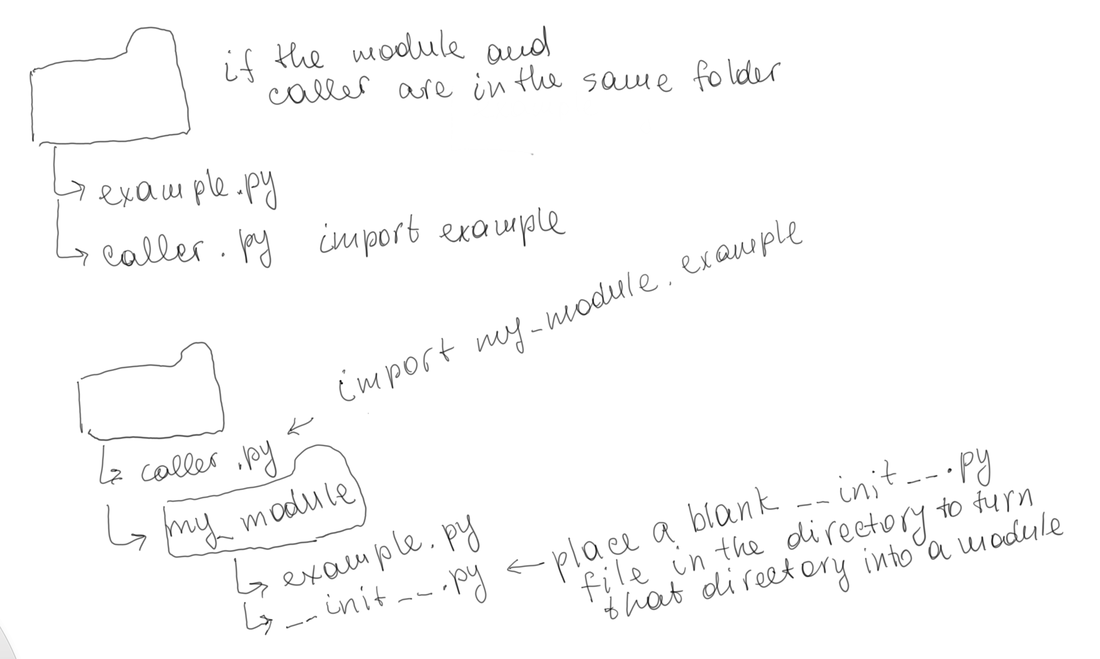
>>> import my_module
>>> example.isPowerOfThree(27)
Traceback (most recent call last):
  File "<stdin>", line 1, in <module>
NameError: name 'example' is not defined
>>> import my_module.example
True
False
True
False
>>> from my_module.example import isPowerOfThree
>>>
PYTEST INTRODUCTION
pytest will run all files of the form test_*.py or *_test.py in the current directory and its subdirectories
example.py
def isPowerOfThree(num:int)->bool:
	if num == 0: return False
	if num % 3 != 0: return False
	if num // 3 == 1: return True

	return isPowerOfThree(num//3)
test_example.py
from example import isPowerOfThree

def test_isPowerOfThree():
	assert isPowerOfThree(27) == True
	assert isPowerOfThree(0) == False
	assert isPowerOfThree(9) == True
	assert isPowerOfThree(45) == False
$ pytest
=============================== test session starts ===============================
platform darwin -- Python 3.7.6, pytest-5.3.5, py-1.8.1, pluggy-0.13.1
rootdir: /Users/gulanurmatova/Desktop/python/lecture5
plugins: hypothesis-5.5.4, arraydiff-0.3, remotedata-0.3.2, openfiles-0.4.0, doctestplus-0.5.0, astropy-header-0.1.2
collected 1 item

test_example.py .                                                           [100%]

================================ 1 passed in 0.03s ================================
(base) Gulas-MacBook-Pro:lecture5 gulanurmatova$
HOMEWORK
Program 1:
Use generator functions to create your own version of range function, call it my_range. Do not use the python's range function in the code.
Output examples:
Example 1:
Use generator functions to create your own version of range function, call it my_range. Do not use the python's range function in the code.
Output examples:
Example 1:
for i in my_range(0,5):
	print(i)
$ python example.py
0
1
2
3
4
Example 2:
for i in my_range(0,5,2):
	print(i)
$ python example.py
0
2
4
Program 2:
We have bunnies standing in a line, numbered 1, 2, ... The odd bunnies (1, 3, ..) have the normal 2 ears. The even bunnies (2, 4, ..) we'll say have 3 ears, because they each have a raised foot. Recursively return the number of "ears" in the bunny line 1, 2, ... n (without loops or multiplication).
bunnyEars2(0) → 0
bunnyEars2(1) → 2
bunnyEars2(2) → 5
Use pytest to validate the correctness of the function
Program 3:
The program below gives elapsed execution time in seconds of the print statement
Create a decorator function that will take any function, with any number of arguments and print the time it takes to execute it
import time

start = time.time()
print("test")
end = time.time()
print(end - start)
Program 4:
You are working on a "secure cloud data transfer" team. You are tasked with creating a mechanism for encrypting data prior to transfer and decrypting it once the transfer is complete. Write two decorator functions encrypt and decrypt . When applied as a decorator, the encrypt function will encrypt the returning string (assume it is always a string) and decrypt function will decrypt the encrypted string back to its original value.
The encryption logic does not matter (just don't leave the string "as is"); for example, a reverse of the string or shifting characters is sufficient (you do not need to have the encryption work perfectly well)
if you like to do more research and use some real crypto algorithms, you may do so for up to 3.3 (double) additional points on the homework. You can use this resource for the research: www.tutorialspoint.com/cryptography_with_python/cryptography_with_python_quick_guide.htm
If you need to use a common key for encryptor and decryptor, you can either duplicate the key in each function's declaration or use the global variable or any other method, ex: env vars (your approach will not be penalized, however it would be nice if you discuss con's and pro's of your implementation)
Use pytest to ensure the decrypted string matches the original string.